

AI tools for product designers streamline research, ideation, prototyping, testing, and handoff by automating repetitive tasks. This guide explores key AI tool categories, adoption strategies, common pitfalls, and practical ways to enhance creativity and productivity.
Design teams move faster than ever, and the tools we reach for have changed dramatically. If you’ve felt the pressure to ship more screens, run more tests, and polish more prototypes without burning out, you’re not alone. The good news is that ai tools for product designers now handle the repetitive parts of the job so you can focus on the creative thinking that actually matters.
By the end of this guide, you’ll know which categories of tools deserve a spot in your workflow, how to choose between them, and how to fit them into your day without losing your design instincts. Here’s what’s inside:
- What AI actually does well (and poorly) in product design
- The main categories of tools and what each one solves
- A side-by-side comparison to help you pick
- A practical plan for adopting these tools step by step
Let’s get into it.
Why AI Has Become Essential for Product Designers
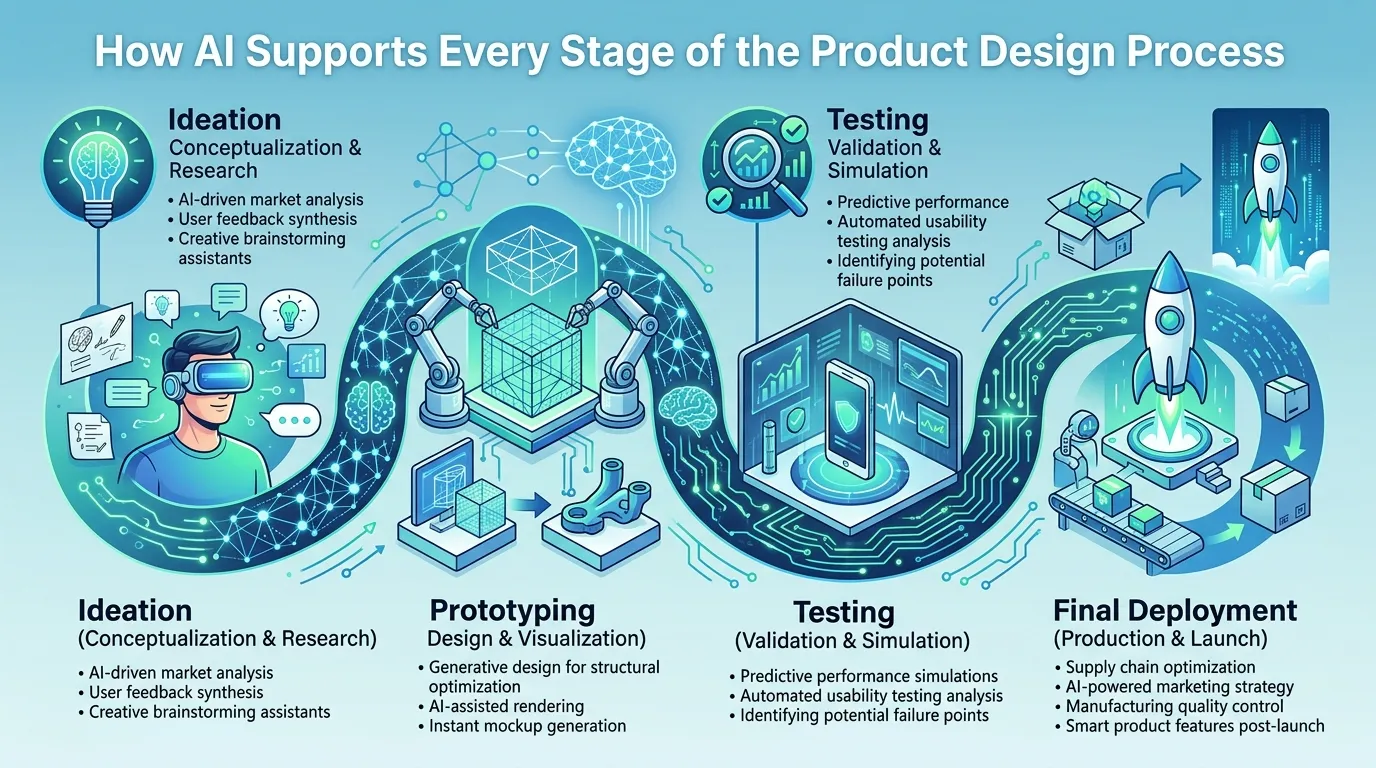
A few years ago, AI features felt like novelties bolted onto design apps. That’s no longer the case. Today, AI Design Tools sit at the center of how teams research, ideate, prototype, and hand off work.
The shift comes down to volume and speed. Products now ship updates weekly, sometimes daily. Designers are expected to test more ideas, support more platforms, and collaborate across larger teams. Doing all of that by hand simply doesn’t scale.
AI for Designers fills the gap by automating the predictable work. It generates first drafts, cleans up messy assets, summarizes research, and suggests layouts. None of this replaces your judgment. Instead, it clears the runway so you can spend your energy on the decisions only a human can make.
Key takeaway: AI doesn’t replace product designers. It removes the busywork that stands between you and your best ideas.
The Real Problem AI Solves
Think about a typical week. You sift through user interviews, sketch concepts, build wireframes, refine UI, write microcopy, and prepare specs for developers. Each step involves work that’s necessary but not always creative.
That’s where the time goes. Research synthesis alone can eat hours. Resizing assets for different breakpoints feels endless. Writing placeholder copy distracts you from the actual interface.
AI tools for product designers attack exactly these friction points. They turn a two-hour research summary into a ten-minute review. They generate three layout options before your coffee gets cold. The result is more time spent on strategy and craft.
How AI Fits Into the Product Design Process
To use these tools well, it helps to map them to the stages of your work. Most product design follows a familiar arc: discover, define, ideate, prototype, test, and hand off. AI now touches every one of these phases.
Discovery and Research
During discovery, you gather information about users, competitors, and the problem space. AI speeds this up by transcribing interviews, clustering feedback, and surfacing patterns you might miss.
Instead of reading fifty support tickets one by one, you can feed them into an AI tool that groups complaints into themes. UX Design AI also helps you draft survey questions, summarize long reports, and translate raw notes into clear insights.
Definition and Strategy
Once you understand the problem, you need to frame it. AI assistants help here too. They can turn scattered findings into tidy problem statements, draft user personas, and propose how-might-we questions.
This stage benefits from speed without sacrificing depth. You still decide what matters. The tools just hand you a stronger starting point.
Ideation and Concept Generation
Ideation is where many designers love AI most. Generative tools produce dozens of concepts in seconds, giving you raw material to react to. Seeing options, even imperfect ones, often unlocks better thinking.
You might prompt a tool for layout variations, color directions, or icon styles. Then you curate, combine, and refine. The machine offers quantity; you bring the taste.
Prototyping and Interaction
Modern Product Design Software now includes AI features that build interactive prototypes from text prompts or rough sketches. Describe a screen, and the tool generates a clickable version. Adjust a flow, and it updates the connections.
This dramatically shortens the gap between idea and testable artifact. You spend less time wiring screens together and more time evaluating whether the experience actually works.
Testing and Iteration
AI also assists with usability testing. Some tools predict where users will look, flag confusing layouts, and even simulate basic user behavior. While these predictions don’t replace real testing, they catch obvious issues early.
After tests run, AI summarizes results, highlights recurring problems, and suggests fixes. That tightens your iteration loop considerably.
Handoff and Documentation
Finally, AI smooths the handoff to engineering. It writes specs, generates redlines, and even produces starter code from designs. AI for Designers reduces the back-and-forth that usually slows down implementation.
Key takeaway: AI shows up at every stage of design. Knowing where it helps most lets you adopt it strategically rather than randomly.
The Main Categories of AI Tools for Product Designers
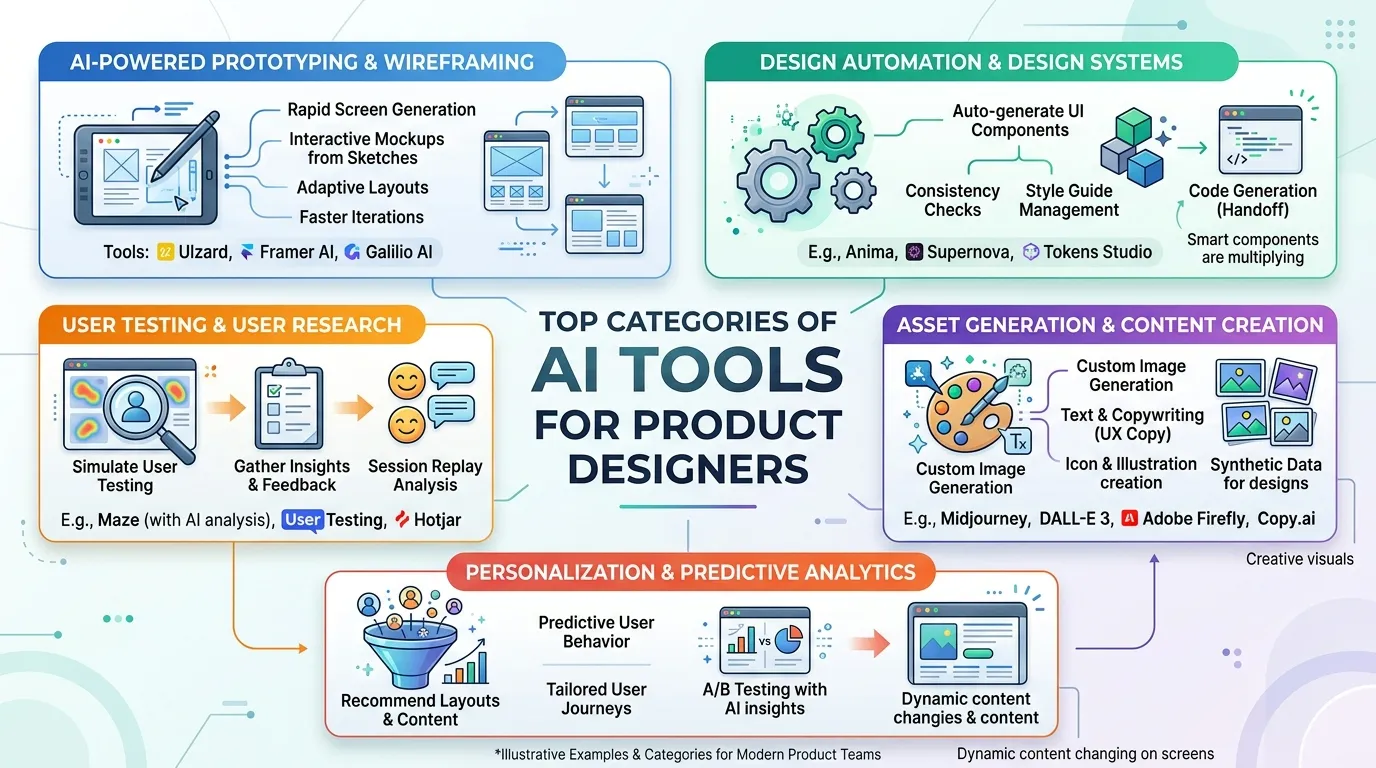
Rather than memorizing product names that change constantly, it’s smarter to understand the categories. Once you know what each type does, you can evaluate any new tool that comes along.
Generative UI and Layout Tools
These tools create interface designs from prompts, references, or rough inputs. They’re ideal for early exploration when you want many directions fast.
What they’re great for:
- Producing multiple layout concepts quickly
- Generating placeholder UI for stakeholder reviews
- Breaking creative blocks with fresh starting points
- Adapting a design to different screen sizes
The trade-off is that generated output often needs refinement. Treat it as a draft, not a final deliverable.
Research and Insight Tools
This category focuses on understanding users. These AI Design Tools transcribe, summarize, tag, and cluster qualitative data so you spend less time sorting and more time learning.
What they handle well:
- Interview transcription and summarization
- Theme detection across feedback sources
- Sentiment analysis on reviews and surveys
- Drafting research plans and discussion guides
The risk here is over-trusting the summary. Always spot-check against raw data to avoid missing nuance.
Content and Microcopy Tools
Words shape experiences as much as visuals do. AI writing assistants generate button labels, error messages, onboarding copy, and tooltips that match your tone.
Where they shine:
- Drafting consistent UX copy across screens
- Suggesting clearer error and empty-state messages
- Localizing content for different markets
- Testing variations for clarity and tone
You’ll still edit for brand voice, but the heavy lifting gets done in seconds.
Asset and Image Tools
These tools handle the visual grunt work: removing backgrounds, upscaling images, generating illustrations, and creating icons. They save hours of tedious manual editing.
Common uses:
- Generating custom illustrations and spot graphics
- Cleaning up or enhancing photography
- Producing icon sets in a consistent style
- Resizing and reformatting assets automatically
Prototyping and Code Tools
Bridging design and development, these tools turn designs into interactive prototypes or production-ready code. They’re a major part of modern Product Design Software.
Strengths include:
- Converting designs to clean front-end code
- Building clickable prototypes from descriptions
- Suggesting component structures
- Speeding up developer handoff
Comparing the Categories at a Glance
Sometimes a table makes the choices clearer. The comparison below shows how each category fits into your workflow, what it saves, and what to watch for.
|
Tool Category |
Best For |
Time Saved |
Main Limitation |
Where It Fits |
|---|---|---|---|---|
|
Generative UI |
Early layout exploration |
High |
Needs heavy refinement |
Ideation, prototyping |
|
Research & Insight |
Synthesizing user data |
Very high |
May miss nuance |
Discovery, testing |
|
Content & Microcopy |
Writing UX text |
Medium |
Requires brand editing |
Definition, prototyping |
|
Asset & Image |
Visual production |
Medium |
Style consistency varies |
Prototyping, handoff |
|
Prototyping & Code |
Design-to-dev handoff |
High |
Code still needs review |
Prototyping, handoff |
Use this as a quick filter. Identify your biggest bottleneck, then pick the category that targets it directly.
Key takeaway: Don’t chase every tool. Match the category to your specific pain point and adopt deliberately.
How to Choose the Right AI Tools for Your Workflow

With so many options, selection matters more than collection. A bloated toolkit slows you down. A focused one accelerates everything. Here’s how to choose wisely.
Start With Your Biggest Bottleneck
Ask yourself where your hours actually disappear. If research synthesis drains your week, prioritize insight tools. If you struggle to produce concepts quickly, lean into generative UI.
Solving your most painful problem first delivers the fastest payoff. It also builds confidence in AI before you expand further.
Check Integration With Your Stack
A tool only helps if it fits your existing setup. The best ai tools for product designers plug directly into the apps you already use, whether that’s your primary design canvas, your documentation hub, or your developer handoff system.
Look for native plugins, smooth import and export, and support for your file formats. Friction at the integration point cancels out the time the tool saves.
Evaluate Output Quality Honestly
Run a real task through each candidate tool. Don’t rely on marketing demos, which always look polished. Test with your actual project files and judge the results against your standards.
Pay attention to how much editing the output requires. A tool that needs heavy cleanup may cost more time than it saves.
Consider Privacy and Data Handling
When you feed user research or proprietary designs into a tool, you’re sharing sensitive data. Read the privacy policy. Understand whether your inputs train the model or stay private.
For regulated industries, this isn’t optional. Choose tools that meet your organization’s security and compliance requirements.
Weigh Cost Against Value
Free tiers are tempting, but they often limit the features that matter. Calculate the value in hours saved, then compare it against the subscription cost. A paid tool that saves five hours a week usually pays for itself fast.
Real Workflow Examples Worth Studying
Theory only takes you so far. Seeing how working designers stitch these tools together makes the benefits concrete. Many practitioners share their exact stacks publicly, which is a great way to learn.
One detailed walkthrough breaks down a real UX workflow and the specific tools behind it. The 8 top AI tools in a real UX workflow ,It’s worth a few minutes of your time. The piece shows how the tools connect across stages. You’ll likely spot a swap or two for your own setup. Studying real workflows like this helps you avoid common adoption mistakes. You see not just which tools people use, but how they sequence them and where they hand control back to human judgment.
Building an AI-Powered Design Workflow Step by Step
Adopting AI works best as a gradual process. Dumping ten new tools into your routine at once creates chaos. A measured rollout sticks far better.
Step 1: Audit Your Current Process
Map out your typical project from start to finish. Note where you lose time, repeat tasks, or feel frustrated. This audit reveals exactly where AI can help most.
Be specific. “Research takes too long” is vague. “Tagging interview quotes takes four hours per study” points you straight to a solution.
Step 2: Introduce One Tool at a Time
Pick the single tool that addresses your biggest bottleneck. Use it for a few real projects before adding anything else. This lets you learn it deeply and measure its impact.
Rushing leads to half-learned tools and abandoned subscriptions. Patience pays.
Step 3: Define Where Humans Stay in Control
Decide upfront which decisions remain yours. Maybe AI drafts copy, but you always approve the final wording. Maybe it generates layouts, but you choose and refine the direction.
Setting these boundaries keeps quality high and prevents you from outsourcing judgment to a machine.
Step 4: Standardize Prompts and Templates
As you find prompts that work, save them. Build a small library of reliable prompts for common tasks. UX Design AI tools reward good inputs, and reusable prompts make your results consistent.
Share these with your team so everyone benefits from the patterns you discover.
Step 5: Review and Refine Regularly
Tools change fast, and so do your needs. Revisit your stack every few months. Drop tools you no longer use. Test new ones against your current setup.
This keeps your workflow lean and current without constant disruption.
Key takeaway: Adopt slowly, set clear human checkpoints, and refine your stack on a schedule. Discipline beats enthusiasm.
Common Mistakes to Avoid With AI Design Tools
Even great tools backfire when used carelessly. Watch out for these traps as you build your workflow.
Over-Relying on Generated Output
The biggest risk is accepting AI output without scrutiny. Generated layouts can look polished while hiding usability flaws. Generated copy can read smoothly while missing your brand voice entirely.
Always review with a critical eye. The tool gives you a draft, not a verdict.
Ignoring Accessibility
AI doesn’t automatically design for everyone. Generated interfaces may use poor color contrast, skip proper labels, or ignore screen reader needs. You must check accessibility yourself.
Treat every AI suggestion as something to test against accessibility standards, not a finished, inclusive design.
Losing Your Design Voice
When you lean too heavily on generative tools, your work can start to look generic. Everyone using the same tools risks producing similar results. Your point of view is what sets your designs apart.
Use AI to support your vision, not to replace it. Inject your own taste at every step.
Skipping Real User Testing
Predictive AI features are helpful, but they don’t replace actual users. Simulated attention maps and behavior predictions miss the surprises real people reveal. Keep testing with humans.
The combination works best: AI catches obvious issues early, real testing catches the rest.
The Future of AI for Designers
The pace of change shows no sign of slowing. Knowing where things head helps you invest your learning time wisely.
Deeper Integration Across Tools
Expect AI to weave more tightly into the apps you already use. Rather than jumping between separate tools, you’ll find intelligent assistance built directly into your design canvas, research hub, and handoff systems.
This reduces friction and makes AI feel less like a separate step and more like a natural part of the work.
More Personalized Assistance
Future tools will learn your style and preferences over time. They’ll suggest layouts that match your patterns and copy that fits your voice. AI for Designers will feel increasingly tailored rather than generic.
Stronger Design-to-Code Pipelines
The gap between design and development keeps shrinking. Emerging Product Design Software produces cleaner, more reliable code from designs. This frees designers and developers to focus on harder problems.
Greater Emphasis on Judgment
As AI handles more production work, the value of human judgment rises. Strategy, empathy, ethics, and taste become your most important skills. The designers who thrive will be those who pair AI’s speed with sharp thinking.
Key takeaway: AI will handle more execution, which makes your judgment and creativity more valuable, not less.
Frequently Asked Questions
What are the best ai tools for product designers in 2026?
The best tools depend on your specific workflow and bottlenecks. Strong options exist across generative UI, research synthesis, content writing, and design-to-code. Focus on the category that solves your biggest pain point first. Test a few candidates with real project files before committing to any subscription.
Will AI replace product designers?
No, AI won’t replace product designers, but it will reshape the role. These tools automate repetitive tasks like resizing assets and summarizing research. Your judgment, empathy, and creative direction remain irreplaceable. Designers who learn to pair AI with strong thinking will simply work faster and focus on higher-value problems.
Are AI design tools worth the cost for freelancers?
For most freelancers, yes. AI Design Tools save hours each week on research, copy, and asset production. That recovered time translates directly into more billable work or better project quality. Start with one paid tool that targets your slowest task, then expand only if the value clearly justifies the spend.
How do I keep my designs from looking generic when using AI?
Use AI for raw material, then refine heavily with your own taste. Generated output gives you a starting point, not a finished design. Inject your point of view through custom details, intentional choices, and a clear brand voice. The tool handles speed while you supply the originality that sets your work apart.
Can UX Design AI tools handle user research well?
They handle parts of research very well, especially transcription, tagging, and summarizing. UX Design AI clusters feedback and surfaces themes far faster than manual sorting. However, always spot-check the output against raw data. These tools can miss nuance, so treat their summaries as a fast first pass, not the final truth.
Do I need coding skills to use design-to-code tools?
Not necessarily, but basic familiarity helps. Modern Product Design Software can generate front-end code from your designs without you writing it yourself. Still, understanding how the code works lets you review output, communicate with developers, and catch problems early. A little technical literacy makes these tools far more useful.
How accurate is AI at predicting user behavior?
AI predictions, like attention maps and behavior simulations, catch obvious issues early but aren’t fully reliable. They estimate likely patterns based on data, not real people. Use them to flag glaring problems before testing. Always validate with actual users, since real behavior consistently reveals surprises that no prediction can anticipate.
What’s the safest way to handle data privacy with AI tools?
Read each tool’s privacy policy before feeding it sensitive data. Check whether your inputs train the model or stay private. For research data and proprietary designs, choose tools with clear security practices and compliance certifications. When in doubt, anonymize information and confirm your organization’s requirements before uploading anything confidential.
How many AI tools should I actually use?
Fewer than you might think. A focused toolkit beats a bloated one every time. Most designers thrive with three to five reliable tools that cover research, generation, and handoff. Adding more creates context-switching and confusion. Master a small set deeply rather than collecting tools you barely understand.
How do I start using AI for Designers without disrupting my workflow?
Begin with a single tool that targets your biggest bottleneck. Use it across a few real projects before adding anything else. Define where you stay in control, and save the prompts that work well. This gradual approach lets you learn each tool deeply while keeping your existing process stable and productive.
Can AI tools help with accessibility in design?
AI can assist, but it won’t guarantee accessibility on its own. Generated designs may use poor contrast or skip proper labels. Some tools offer accessibility checks, which help catch common issues. Still, you must review every output against accessibility standards yourself. Treat AI suggestions as drafts that require careful, human-led inclusive review.
What skills matter most as AI takes over production tasks?
As AI handles more execution, human judgment becomes your edge. Strategy, empathy, problem framing, and design taste rise in importance. Communication and collaboration skills also matter more, since you’ll guide both tools and teams. The designers who thrive will combine AI’s speed with sharp thinking that machines simply cannot replicate.
Final Thoughts
AI tools for product designers have moved from novelty to necessity, and the shift rewards anyone willing to adopt them thoughtfully. The core lesson is simple: let AI handle the repetitive work so you can focus on strategy, empathy, and craft. Start by auditing your process, pick the one tool that solves your biggest bottleneck, and set clear checkpoints where your judgment stays in charge. Build your stack slowly, test output against real standards, and never skip genuine user testing.
Your next step is easy. Map your current workflow this week and circle the single task that drains the most time. Then find one tool that targets it directly and try it on a real project. That small, focused experiment will teach you more than any feature list ever could, and it sets you on the path to a faster, sharper design practice.
